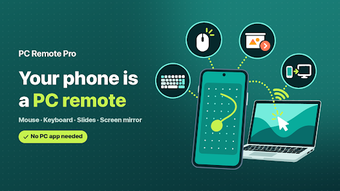
Turn your Android into a wireless PC mouse, keyboard and webcam
Turns an Android phone into a Bluetooth mouse, keyboard, touchpad and webcam for remote PC control, including browser-based mirroring and OBS streaming. PC Remote Pro - MouseKeyboard from CloudEx Inc. targets desktop and HTPC workflows, offering no-install Bluetooth HID, a multi-finger touchpad, presentation controls with a vibrating timer and PIN-protected mirroring. Professionals running presentations and home theater users gain wireless control and camera input without installing server software on the host machine.
What does the tool do for remote control tasks?
The app converts a mobile device into multiple PC peripherals. It presents itself as a standard HID over Bluetooth for mouse and keyboard use without host-side software, offers an advanced touchpad with multi-finger gestures and edge scrolling, and provides dedicated presentation controls such as slide navigation and a vibrating ring timer.
Does it affect system performance during use?
Network and CPU impact is limited by design. Screen mirroring and webcam streaming run through a PC browser via QR code or address, so the heavy work is handled by the browser; Bluetooth HID mode operates independently of host CPU load because the phone identifies as a hardware device.
Is the app safe to run on a production or shared machine?
Safety features reduce accidental exposure. Screen mirroring requires a PIN and both devices must share the same Wi-Fi or tethered network. The Bluetooth mode requires no server install, which lowers privilege escalation risk since no background service is written to the host.
How steep is the learning curve and who needs technical skills?
Most basic functions are accessible to non-technical users. The no-install Bluetooth pairing and one-tap presentation controls let speakers and HTPC users operate without configuration. Advanced users can access macros and OS shortcuts for app switching and custom commands, which require basic familiarity with system shortcuts.
Recommended for presenters and HTPC operators who need wired-free peripherals
The app is a capable option for people who need remote input and mobile camera feeds without installing host software. Expect straightforward Bluetooth pairing for simple control, and use browser mirroring when you need camera or screen streams. Recommended.